Butterbase CRM
App ID: app_44zjayftl7b3 · Region: us-east-1 · 56 functions · 33 clones
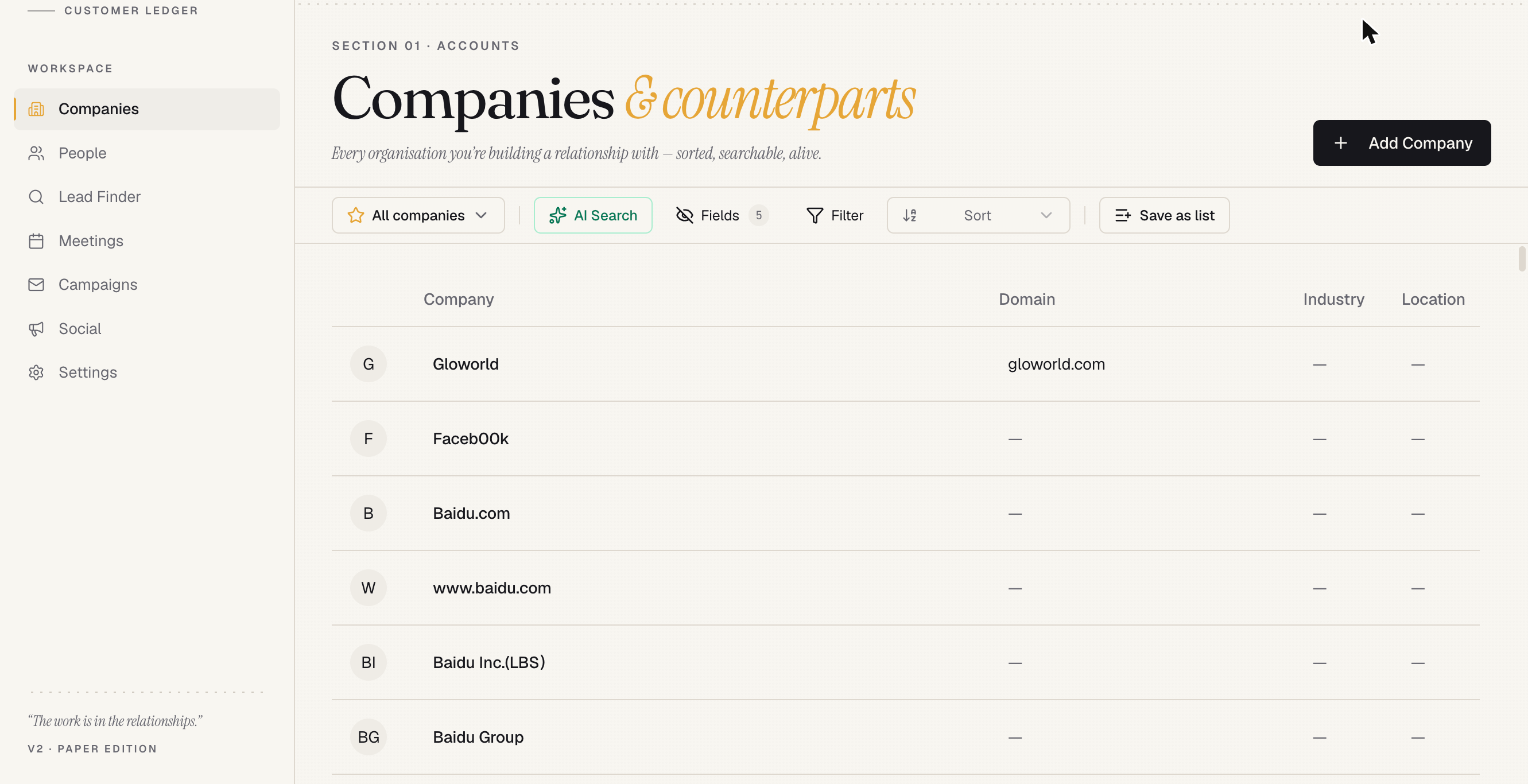
An AI-native CRM. Contacts and companies enrich themselves, Gmail and Calendar sync in on a schedule, meetings get recorded and summarised by a notetaker bot, and an agent proposes deals off the activity it sees. Campaigns and social publishing are built in.
This is the largest template in the catalog and the easiest to stand up: every environment variable it needs is filled in automatically at clone time. There is no third-party API key you must obtain before it will boot.
What’s in it
Section titled “What’s in it”Contacts, companies, and enrichment
Section titled “Contacts, companies, and enrichment”enrich-person · enrich-company · summarize-company · find-duplicates · trigger-enrichment · crm-record-activity
Records enrich from public sources on demand or on write. Duplicate detection runs across the contact set, and companies get an AI-written summary.
Google sync
Section titled “Google sync”ingest-gmail · ingest-calendar · auto-sync-google (cron) · upsert-sync-settings
Mail and calendar pull into the activity timeline on a schedule. Per-user sync settings decide what’s ingested.
Meetings and notetaking
Section titled “Meetings and notetaking”start-meeting-bot · cancel-meeting-bot · notetaker-webhook · ingest-meeting-transcript · get-meeting-notes · crm-upsert-meeting · migrate-meetings-to-substrate
A bot joins the call, transcribes it, and writes structured notes back onto the meeting record. The webhook secret for this is minted for you during the clone.
agent-chat · ai-search · ai-suggest-filters
Natural-language chat over the CRM, semantic search across records, and AI-generated list filters.
propose-deals · accept-deal-proposal · agent-proposals-expire (cron)
An agent proposes deals from observed activity; a human accepts. Unaccepted proposals expire on a schedule.
Lead generation
Section titled “Lead generation”lead-search · lead-save · lead-cost-preview · list-lead-lists
Search for leads, preview the credit cost before committing, and save results into lists.
Campaigns
Section titled “Campaigns”create-campaign-list · start-campaign · pause-campaign · process-campaign-sends (cron) · resolve-pending-emails (cron) · reply-to-inbox-item
Build a list, start a sequence, and let the cron workers handle sending and reply resolution.
Social publishing
Section titled “Social publishing”create-social-post · edit-social-post · clone-social-post · publish-social-post · send-social-post · delete-social-post-from-platform · process-scheduled-social-posts (cron) · comment-on-social-post · discover-comment-targets · run-comment-discovery (cron) · execute-comment-campaign · fetch-post-replies (cron) · get-subreddit-flairs · configure-social-toolkit
Draft, schedule, and publish posts across platforms, plus a comment-campaign engine that finds targets and engages on a schedule.
Integrations, team, and substrate
Section titled “Integrations, team, and substrate”register-integration · unregister-integration · list-workspace-integrations · cleanup-orphan-integrations (cron) · invite-member · accept-invite · check-allowlist · substrate-proxy · list-substrate-entities
Cloning it
Section titled “Cloning it”Dashboard
Section titled “Dashboard”- Open Templates in the dashboard.
- Click butterbase-crm, then Clone.
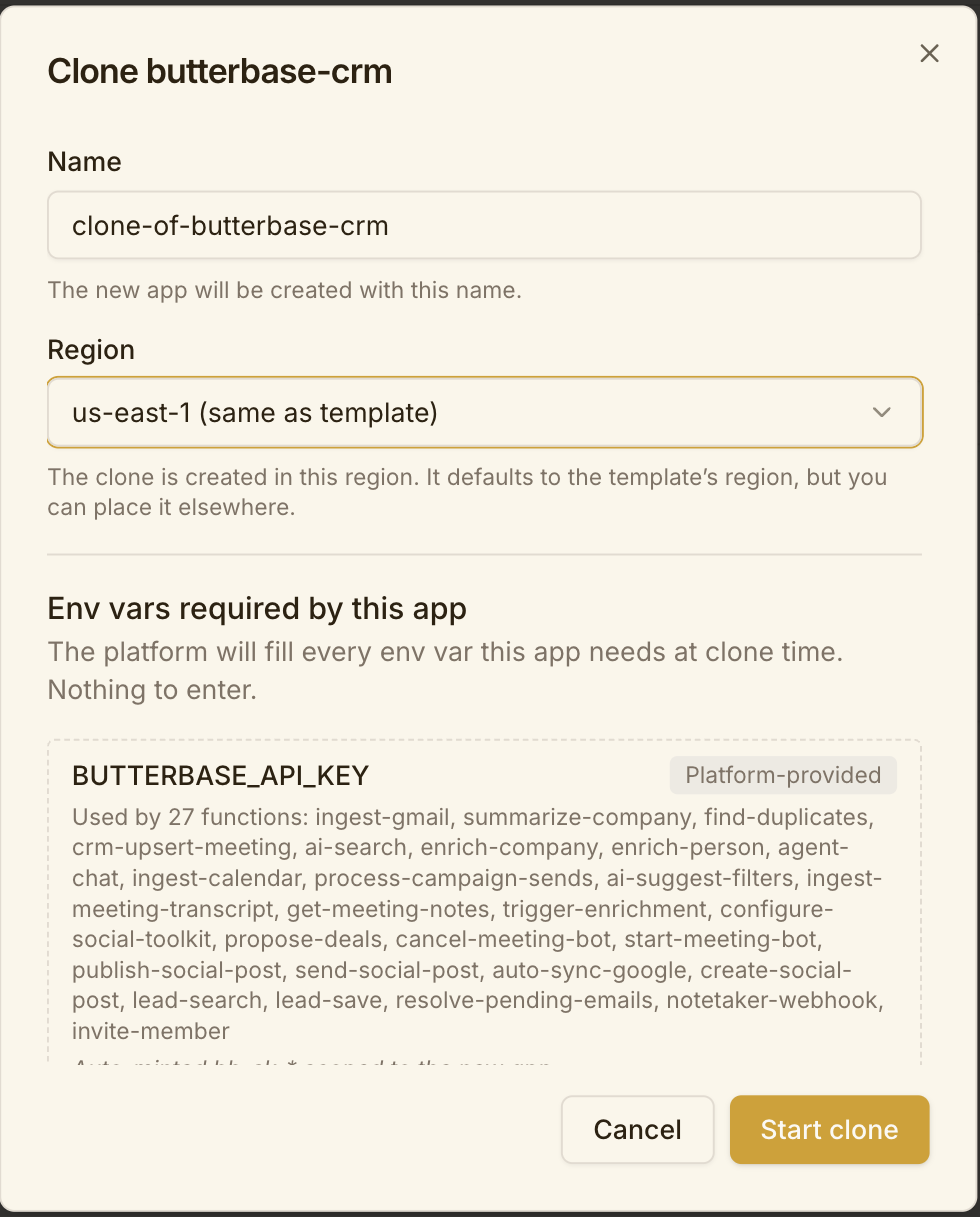
- Name your app. The region is fixed to the template’s (
us-east-1) in the dashboard. - The env-vars step says “Nothing to enter” — every key this app needs is platform-provided. Click straight through.
- Click Start clone and wait. 56 functions take a few minutes to redeploy.
butterbase clone app_44zjayftl7b3 ./my-crm --name "My CRM" --region us-east-1manage_app action: "clone" source_app_id: "app_44zjayftl7b3" name: "My CRM" region: "us-east-1"Then poll:
manage_app action: "get_clone_job", job_id: "<job_id>"POST /v1/templates/app_44zjayftl7b3/clone{ "name": "My CRM", "region": "us-east-1" }Setting it up after the clone
Section titled “Setting it up after the clone”1. Read the clone warnings
Section titled “1. Read the clone warnings”manage_app action: "get_clone_job", job_id: "<job_id>"If the meetings webhook was rebuilt, a warning contains a freshly minted wsec_* shown exactly once. Capture it — it’s already wired into notetaker-webhook, but you’ll want it on record.
2. Confirm the auto-filled keys landed
Section titled “2. Confirm the auto-filled keys landed”Every function in this template uses only platform-convention keys:
| Key | Used by | Filled with |
|---|---|---|
BUTTERBASE_API_KEY | 27 functions | A fresh bb_sk_* scoped to your new app |
BUTTERBASE_API_URL | ai-suggest-filters, lead-search, lead-save | Your control API URL |
BUTTERBASE_APP_ID | ai-suggest-filters, lead-search, lead-save, configure-social-toolkit | Your new app id |
NOTETAKER_WEBHOOK_SECRET | notetaker-webhook | A minted wsec_* |
BB_SUBSTRATE_KEY | substrate-proxy | A minted bb_sk_* |
Spot-check one:
manage_function action: "get", app_id: "<your_app_id>", function_name: "agent-chat"3. Add Google OAuth credentials
Section titled “3. Add Google OAuth credentials”Gmail and Calendar ingest need your Google client id and secret — the source’s did not transfer.
manage_oauth action: "configure" app_id: "<your_app_id>" provider: "google" client_id: "..." client_secret: "..." redirect_uris: ["https://api.butterbase.ai/auth/<your_app_id>/oauth/google/callback"]Enable the Gmail and Calendar scopes on the Google side. Until this is done, ingest-gmail, ingest-calendar, and auto-sync-google will run and find nothing.
4. Connect the integrations you actually want
Section titled “4. Connect the integrations you actually want”Social publishing and comment campaigns run through Integrations. Register only the platforms you’ll use:
manage_integrations action: "list_available" # what you can connectmanage_integrations action: "list_connected" # what this app already hasThe cron jobs (process-scheduled-social-posts, run-comment-discovery, fetch-post-replies) are harmless with nothing connected — they’ll no-op.
5. Decide about the meetings notetaker
Section titled “5. Decide about the meetings notetaker”start-meeting-bot dispatches a bot into calls. Confirm you’re happy with that before pointing it at real meetings, and check the recording-consent rules that apply where you and your participants are.
6. Point CORS at your frontend
Section titled “6. Point CORS at your frontend”manage_app action: "update_cors" app_id: "<your_app_id>" allowed_origins: ["https://mycrm.com", "http://localhost:5173"]7. Check the frontend
Section titled “7. Check the frontend”The clone comes up with the CRM frontend already live, re-pointed at your app — the overview page shows the URL. Open it and confirm it loads before doing anything else.
To edit it, pull the source locally:
butterbase repo init <your_app_id>butterbase repo pullcd <dir> && npm install && npm run buildThen redeploy — see Frontend Deployment. The frontend’s VITE_* variables are separate from function env vars and are not inherited.
8. Review the security posture
Section titled “8. Review the security posture”56 functions is a large surface. Before real data goes in:
manage_app action: "get_config"— check the access mode.- Read the RLS policies that came across; see Row-Level Security.
- Note which functions are
httptriggered and reachable, and lock down anything you aren’t using.
Verifying it works
Section titled “Verifying it works”manage_schema action: "get"— schema is present.invoke_functiononai-search— a500almost always means a missing env var.- Sign up a test user through your auth config.
- Connect one Google account and run
ingest-gmail. - Load the frontend and click through contacts.
Cost note
Section titled “Cost note”This template is AI-heavy — enrichment, summarisation, chat, and search all draw AI credits, and several cron jobs run unattended. Set a spending cap before you leave it running.