
Butter Support
App ID: app_0ycj4ad7odud · Region: us-east-1 · 30 functions + a Durable Object · 19 clones
An AI support desk. An embeddable widget takes questions, RAG answers them from your own documentation, and an agent handles replies — either drafting for human approval or resolving on its own, depending on how you set its autonomy. Approved patterns get promoted into policies, so the system gets more autonomous as you teach it.
This is the better of the two templates for seeing RAG, Durable Objects, and Substrate working together. It needs a little more configuration than Butterbase CRM — two function keys and six Durable Object keys.
What’s in it
Section titled “What’s in it”The embeddable widget
Section titled “The embeddable widget”widget-ingest · widget-followup · widget-fetch-history · rotate-widget-secret
A drop-in widget for your own site. Questions arrive, follow-ups thread onto the same conversation, and history is retrievable. The widget secret can be rotated without a redeploy.
Docs ingestion and RAG
Section titled “Docs ingestion and RAG”ingest-docs · refresh-docs (cron) · delete-docs-source · request-doc-upload-url · ai-rag-query
Point it at your documentation, upload files through a presigned URL, and it chunks and embeds them into a RAG collection. refresh-docs re-crawls on a schedule so answers don’t go stale.
AI answering
Section titled “AI answering”ai-chat-completion · ask-support-overview
Chat completion over a ticket’s context, plus a whole-queue overview question (“what are people struggling with this week?”).
Agent proposals with human approval
Section titled “Agent proposals with human approval”do-substrate-propose · approve-proposal · reject-proposal · expire-agent-proposals (cron) · admin-autonomy
The agent never acts unilaterally. It proposes; a human approves or rejects; stale proposals expire. admin-autonomy is the dial that decides how much the agent may do on its own.
Replies and escalation
Section titled “Replies and escalation”auto-reply-worker · send-draft-reply · execute-escalation
Approved drafts go out through the reply worker. Anything the agent can’t handle escalates on a defined path.
Learning from what humans did
Section titled “Learning from what humans did”convert-to-policy · mark-as-commitment · sweep-pattern-signals (cron)
A good resolution can be promoted into a reusable policy. Commitments made to a customer are tracked. The cron sweeper looks for repeated patterns worth codifying.
Substrate, team, and ops
Section titled “Substrate, team, and ops”substrate-proxy · substrate-read-internal · sync-ticket-artifact · auth-bootstrap-hook · invite-teammate · remove-teammate · fetch-ai-usage · cleanup-idempotency-keys (cron)
Cloning it
Section titled “Cloning it”Dashboard
Section titled “Dashboard”- Open Templates in the dashboard.
- Click butter-support, then Clone.
- Name your app. The region is fixed to the template’s (
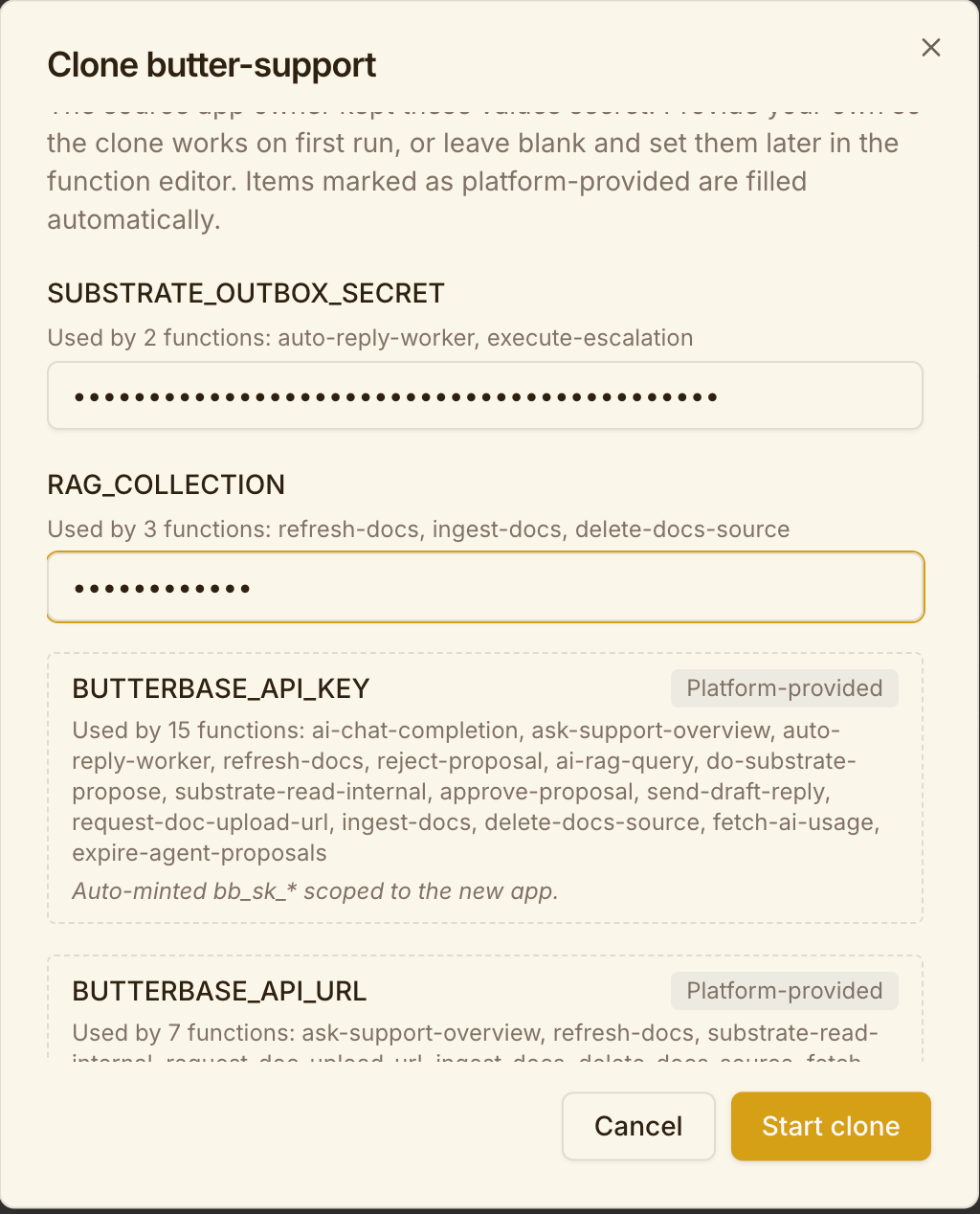
us-east-1) in the dashboard. - The env-vars step asks you for two values —
SUBSTRATE_OUTBOX_SECRETandRAG_COLLECTION. Fill them now, or leave blank and set them in the function editor later. - Click Start clone.
butterbase clone app_0ycj4ad7odud ./my-support --name "My Support Desk"Supply the two required keys inline so the functions boot working:
manage_app action: "clone" source_app_id: "app_0ycj4ad7odud" name: "My Support Desk" env_var_values: { "auto-reply-worker": { "SUBSTRATE_OUTBOX_SECRET": "<generate a strong secret>" }, "execute-escalation": { "SUBSTRATE_OUTBOX_SECRET": "<same secret>" }, "refresh-docs": { "RAG_COLLECTION": "support-docs" }, "ingest-docs": { "RAG_COLLECTION": "support-docs" }, "delete-docs-source": { "RAG_COLLECTION": "support-docs" } }Check what’s still outstanding in the returned pending_env_vars.
Setting it up after the clone
Section titled “Setting it up after the clone”1. Fill the two required function keys
Section titled “1. Fill the two required function keys”Everything else auto-fills. These two do not:
| Key | Functions | What to set it to |
|---|---|---|
SUBSTRATE_OUTBOX_SECRET | auto-reply-worker, execute-escalation | A strong random secret you generate. Use the same value in both — they’re two halves of one outbox flow. |
RAG_COLLECTION | refresh-docs, ingest-docs, delete-docs-source | The name of the RAG collection you’ll create in step 3. Must match exactly across all three. |
manage_function action: "update_env" app_id: "<your_app_id>" function_name: "auto-reply-worker" env: { "SUBSTRATE_OUTBOX_SECRET": "..." }2. Re-set the Durable Object environment
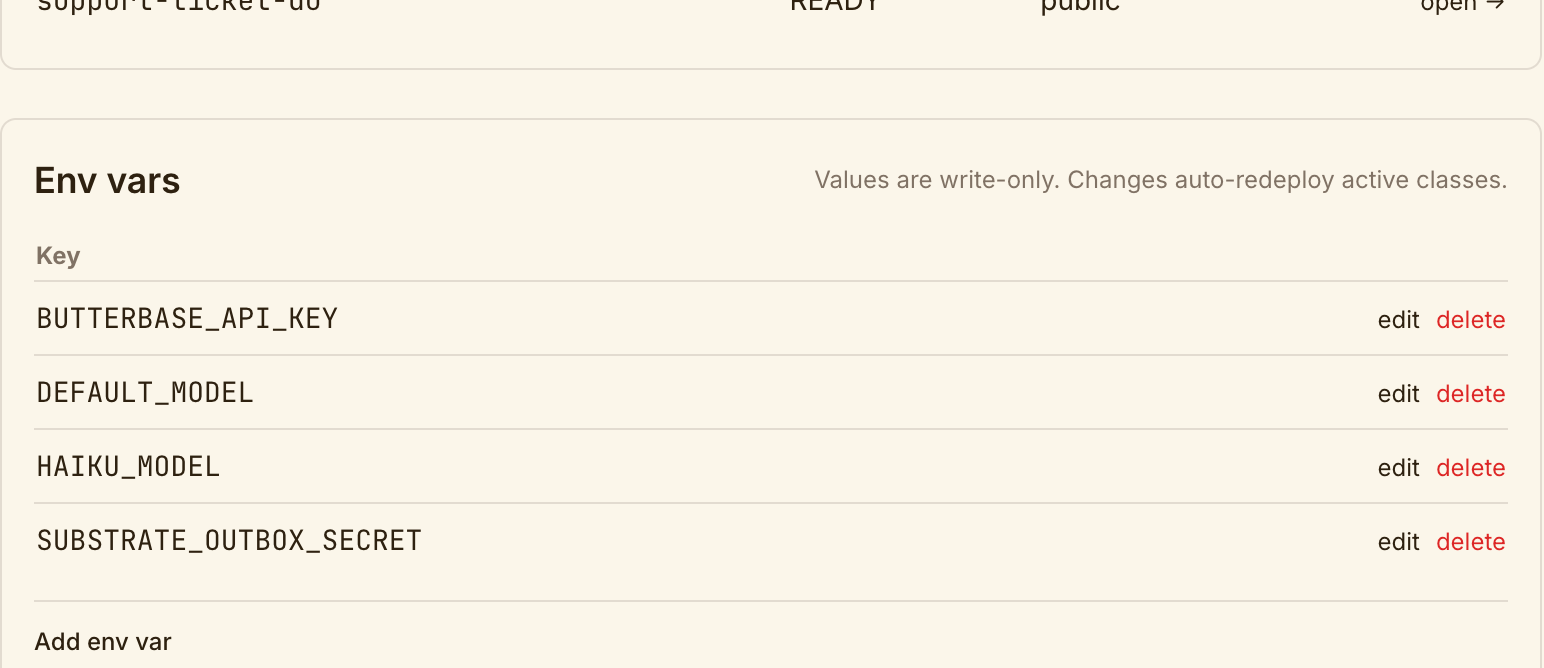
Section titled “2. Re-set the Durable Object environment”The clone arrives with four of the seven Durable Object env keys already set. Three are missing and you must add them:
| Key | After the clone | What to set it to |
|---|---|---|
BUTTERBASE_API_KEY | ✅ Present | — |
DEFAULT_MODEL | ✅ Present | — (verify the value suits you) |
HAIKU_MODEL | ✅ Present | — (verify the value suits you) |
SUBSTRATE_OUTBOX_SECRET | ✅ Present | — |
BUTTERBASE_API_URL | ❌ Missing | Your control API URL, e.g. https://api.butterbase.ai |
BUTTERBASE_APP_ID | ❌ Missing | Your new app id |
RAG_COLLECTION | ❌ Missing | The same collection name as step 1 |
The three that go missing are exactly the ones that would be wrong if copied — two point at the source app, and the third names a RAG collection that doesn’t exist in your clone yet.
Check what you actually have before setting anything:
manage_durable_objects action: "list_env", app_id: "<your_app_id>"One key per call — DO env vars are app-wide, not per-class, so no name is needed:
manage_durable_objects action: "set_env" app_id: "<your_app_id>" key: "BUTTERBASE_APP_ID" value: "<your_app_id>"Changing an env var auto-redeploys the active classes. Confirm with action: "list_env".
3. Create the RAG collection and ingest your docs
Section titled “3. Create the RAG collection and ingest your docs”manage_rag_content action: "create_collection" app_id: "<your_app_id>" name: "support-docs"The name must match the RAG_COLLECTION value from steps 1 and 2. Then point ingest-docs at your documentation, or upload files via request-doc-upload-url. See RAG.
Until the collection has content, the widget will answer from the model’s general knowledge rather than your docs — which looks like it’s working but isn’t.
4. Rebind the auth hook if a warning said so
Section titled “4. Rebind the auth hook if a warning said so”This template ships auth-bootstrap-hook, which runs after login. If the clone couldn’t rebind it, the warning will say so:
manage_auth_config action: "configure_auth_hook" app_id: "<your_app_id>" post_auth_function: "auth-bootstrap-hook"5. Set the autonomy level deliberately
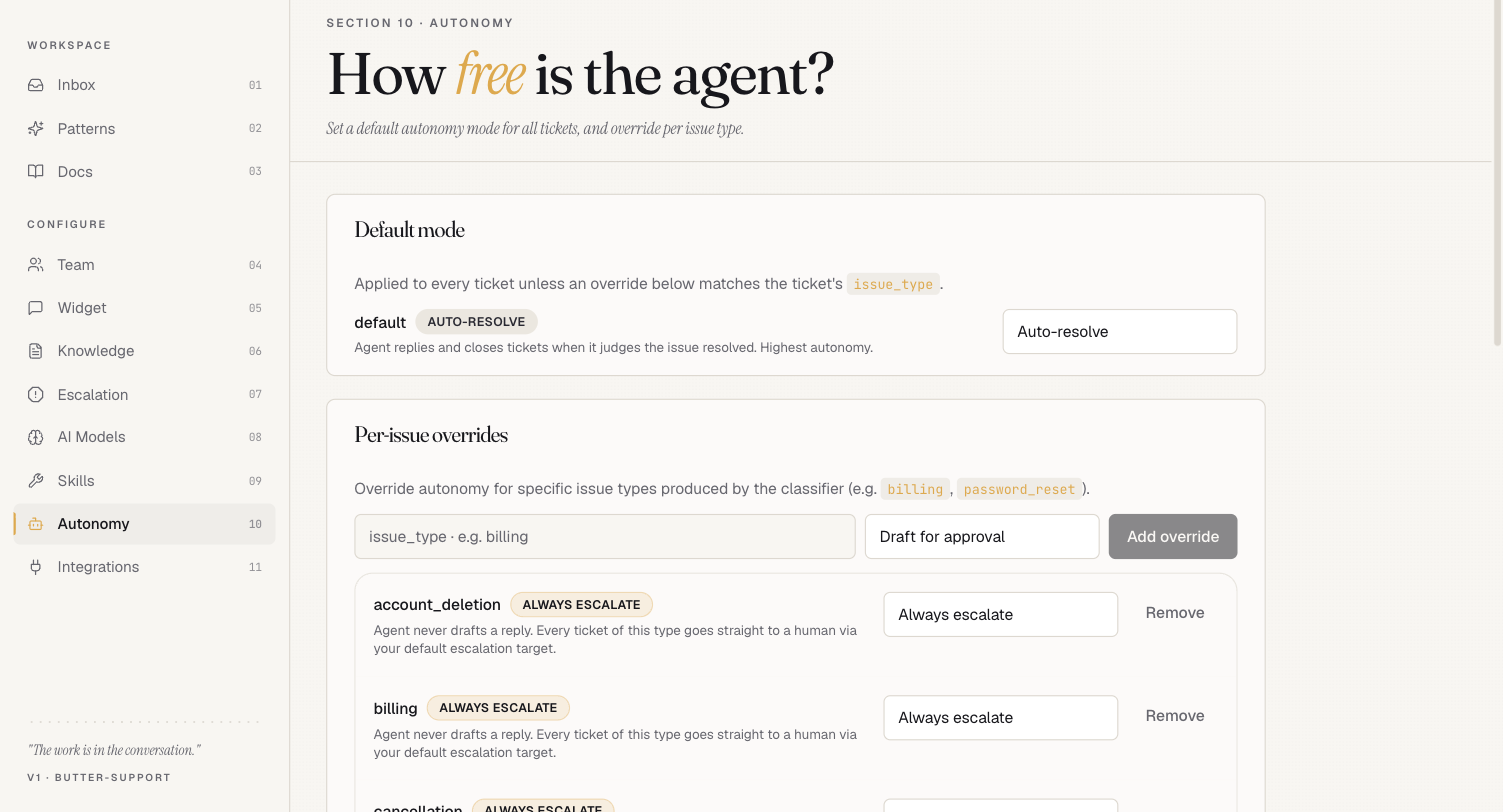
Section titled “5. Set the autonomy level deliberately”Console → Autonomy. This is the most consequential setting in the template and it does not ship conservative.
| What the clone arrives with | |
|---|---|
| Default mode | AUTO-RESOLVE — the agent replies and closes tickets when it judges the issue resolved. Highest autonomy, no human in the loop. |
| Per-issue overrides | account_deletion, billing, cancellation → ALWAYS ESCALATE. These never get an agent reply; they go straight to your escalation target. |
Other modes available per issue type include Draft for approval, which is the approval-gated behaviour most people assume is the default. It isn’t.
Decide deliberately before any real traffic arrives:
- Set the default to Draft for approval while you watch the queue, then raise it once you trust the replies; or
- Keep
AUTO-RESOLVEand add overrides for every issue type where a wrong answer is expensive.
The override list is driven by the classifier’s issue_type, so it only protects categories you have actually enumerated. Anything the classifier labels with a type you have not overridden falls through to the default mode.
6. Rotate the widget secret
Section titled “6. Rotate the widget secret”invoke_function app_id: "<your_app_id>", function_name: "rotate-widget-secret"Do this before embedding the widget anywhere public, so you aren’t running on a value derived from the source app.
7. Point CORS at the sites hosting the widget
Section titled “7. Point CORS at the sites hosting the widget”manage_app action: "update_cors" app_id: "<your_app_id>" allowed_origins: ["https://mysite.com", "https://docs.mysite.com"]The widget is cross-origin by design — if CORS is wrong, it silently fails to load.
8. Check the frontend
Section titled “8. Check the frontend”The clone should come up with the Support frontend already live, re-pointed at your app. Confirm it loads, then pull the source locally if you want to change it:
butterbase repo init <your_app_id>butterbase repo pullRedeploy per Frontend Deployment.
Verifying it works
Section titled “Verifying it works”manage_durable_objects action: "list_env"— all seven keys present.manage_rag_content action: "list_collections"— your collection exists and has documents.invoke_functiononai-rag-querywith a question your docs answer — check the response cites your content, not generic knowledge.- Submit a question through the widget and confirm a ticket appears in the Inbox. A fresh clone’s inbox is empty — no seed tickets come across, so the widget is the only way to put something in it.
- Approve it and confirm the reply actually sends.
Cost note
Section titled “Cost note”RAG ingestion embeds every chunk, refresh-docs re-crawls on a cron, and every widget question is a model call. Set a spending cap and point HAIKU_MODEL at something cheap before you open the widget to real traffic.